
Home safety training
Roles
Senior XR Technical Consultant
Platforms
Quest 2 & 3
Team Size
~4
Duration
~4 Months
safety training
home accidents
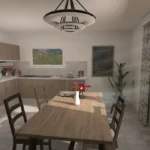
Immerse yourself in a safer home environment with this interactive VR experience. Face realistic accident scenarios, learn to recognize hazards, and understand the impact of unsafe behavior—all from a first-person perspective. Build safer habits at home in an engaging, risk-free way. Safety awareness starts here.
Overview
- Contributed across gameplay systems, interaction design, and developer tooling for the Home Safety VRPE module
- Designed the kitchen training experience with support for both left-handed and right-handed interactions to improve accessibility and usability
- Developed a Project Wizard tool to automate new VRPE module setup, reducing repetitive manual configuration and improving project consistency
- Built a non-linear workflow system using Playmaker to support more flexible training progression and branching interaction flows
- Addressed recurring team challenges around scalability, flexibility, and development speed through workflow and tooling improvements
implementation details behind the project
Technical Break Down
roles across development and design
Contributions
- Collaborated with another Senior Technical Consultant to discuss best practices for improving the flexibility and scalability of the current VRPE architecture
- Shared updates and recommendations on XR best practices across the development team to support consistent technical standards
- Supported 3D Technical Artists and 3D Designers through tool automation workflows to improve efficiency and iteration speed
- Mentored and supported a junior developer with implementation guidance and technical problem-solving
- Managed and communicated retrospective discussions, helping identify improvements in workflows, collaboration, and delivery processes
- Created a Project Wizard script to automate new VRPE module setup, including localization table generation, GitHub repository creation with correct branching, folder structure setup, naming conventions, and required prefab variants
- Implemented using Abstract Factory, Factory, and Strategy patterns to ensure the wizard remains flexible and extensible across different module types
- Developed a non-linear workflow system using a node-based approach with Playmaker, including a working prototype inside Unity
- Integrated the system with the existing linear architecture without requiring major refactoring, maintaining full backward compatibility with legacy projects
- Enabled flexible workflows such as looping back to previous steps until correctly completed
- Designed the system to require minimal additional work to support multiplayer scenarios
- Solution was ultimately discarded in favour of an in-house approach that kept the hierarchy as the single source of truth, with a custom node-based visual tool planned as a future improvement if time allowed
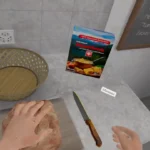
- Built the kitchen training scene where users learn to safely cut bread
- Implemented support for both left-handed and right-handed users through adaptable hand orientation setups
- Helped polish and complete remaining workflows across the Home Safety module to improve overall user experience and stability
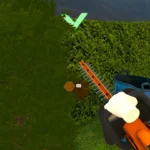
- Worked on blood effect VFX to enhance realism and visual feedback during training scenarios
- Refactored the existing VR socket and interactable system to better guide users toward using specific interactables near sockets, supporting different hover states, guiding behaviours, and multiple interactable types within sockets
- Used Unity Auditor to identify and resolve performance issues across scripts and assets
Assisted with setting up the Meta Store submission and navigating the review and clearance process
Performance highlights and achieved goals.
Key REsults
- Applying Abstract Factory and Strategy patterns to a real tooling problem reinforced how design patterns solve practical scalability challenges beyond just code structure
- Building ambidextrous hand interaction highlighted how small UX decisions significantly affect accessibility in VR
- Prototyping the Playmaker workflow system deepened understanding of node-based architecture trade-offs, particularly around what it means for a system to have a single source of truth
- Using Unity Auditor provided a structured approach to performance profiling that complemented intuition-based optimisation
- Navigating the Meta Store review process gave first-hand experience with platform certification requirements for standalone VR devices
Tools, Sdks, Design Patterns
Tech Stack
- Unity
- C#
- Abstract Factory Pattern
- Factory Pattern
- Strategy Pattern
- Playmaker
- XR Interaction Toolkit
- Unity Auditor
- Meta Store
- Localization
- Meta Quest 2 & 3